
Windows Compatibility Mode
System abstraction
General
Utilities
Windows (XP and later) includes an underlying compatibility engine that uses compatibility shims to apply fixes and changes for applications that might otherwise not function properly. This is intended as a way to enhance backwards compatibility for older applications, but can also be used for solving or working around various issues that an application might have.
The underlying compatibility engine includes a wide array of compatibility fixes and modes available for use by system administrators through the Compatibility Administrator utility included with the Windows Assessment and Deployment Kit (Application Compatibility Toolkit for 7 and older). However, most of those are not of interest for the average end-user, so Microsoft makes a few key compatibility settings easily accessible through the Compatibility tab in the properties of an executable or shortcut.
The internal application compatibility database of Windows includes a list of auto-applied fixes and modes for known applications and issues. 6,125 applications are included in this list as of Windows 11 23H2.[1]
The underlying Application Compatibility Engine component is forcefully always enabled in Windows 8.1 and later.[2]
Note that compatibility settings will not fix problems such as missing DLL errors or rainbow colors. Refer to their respective pages for further details.
| Accessing compatibility settings |
|---|
Notes
|
More information
- Make older programs compatible with Windows
- Compatibility Fixes for Windows 10, Windows 8, Windows 7, and Windows Vista
- Compatibility Administrator User's Guide
- Application to bulk manage compatibility settings
Related articles
Compatibility mode
Try enabling this setting and choosing a Windows version that the game was originally designed for. The versions listed will vary somewhat depending on the version of Windows that is currently being used as well as the CPU architecture of the game (32-bit/64-bit).
As of Windows 11, here are all the possible options:
- Windows 95
- Windows 98 / Windows Me
- Windows NT 4.0 (Service Pack 5) - no longer listed but can be entered manually (e.g. the PCGW-hosted fix for Homeworld hardware acceleration implements it)
- Windows 2000 (SP1, SP2, SP3, SP4)
- Windows XP (Service Pack 2)
- Windows XP (Service Pack 3)
- Windows Server 2003 (Service Pack 1)
- Windows Server 2008 (Service Pack 1)
- Windows Server 2012 (Service Pack 1)
- Windows Server 2016 (Service Pack 1)
- Windows Vista
- Windows Vista (Service Pack 1)
- Windows Vista (Service Pack 2)
- Windows 7
- Windows 8
Settings
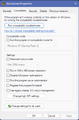
Windows 11 compatibility settings
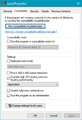
Windows 10 compatibility settings
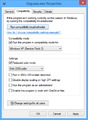
Windows 8/8.1 compatibility settings
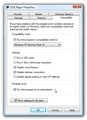
Windows Vista/7 compatibility settings
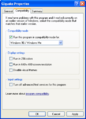
Windows XP compatibility settings


Reduced color mode (8/8.1/10/11)
Try choosing the appropriate mode when running 256-color and 16-bit games. This is also useful for games that run correctly without this setting but warn about too many colors; enabling this setting will skip the warning.
For Windows 7 and earlier, 16-bit color can be used by changing the desktop color depth before running the game.
Run in 256 colors (XP/Vista/7)
- Replaced by Reduced color mode for Windows 8 and later
Try this when running 256-color games. This is also useful for 256-color games that run correctly without this setting but warn about too many colors; enabling this setting will skip the warning.
Note: Beginning in Windows 8 onward, this setting does not actually switch the color depth; it merely tells the game it's running in that depth without actually changing. As such, if the game absolutely requires 8-bit color to actually function (most notably if it uses palette cycling animation or fades that do not work above this depth), this will not solve the problem.
Run in 640x480 screen resolution
This sets the Windows resolution to 640x480 before launching the game.
Disable visual themes
Stops visual themes built in to the operating system from affecting the game.
Disable desktop composition
Disables Aero, the default theme and graphical user interface.
Disable display scaling on high DPI settings
- Windows 10 Update renamed this option to "Override high DPI scaling behavior." with multiple options.
This prevents automatic resizing of programs if large-scale font size is in use. To disable display scaling in Windows 10, tick the "Override high DPI scaling behavior." and choose Application option in the dropdown.
Disable fullscreen optimizations
- Only applicable for Windows 10 v1703 and later, as previous versions did not include those fullscreen optimizations.
This prevents the use of Windows 10's built-in fullscreen optimizations for games running in exclusive fullscreen mode.
Use legacy display ICC color management (11 only)
This prevents the use of Windows 11's advanced color management on the application level. It may be required for resolving DirectDraw incompatibility in some games. More information on the subject is available from Microsoft's documentation.
Run this program as an administrator
- Automatically applied when the compatibility mode is set to Windows XP or earlier.
This setting makes the application run as an administrator, which is required for some older games. It is also possible to work around issues caused by separate third-party injectors by using this option, as those third-party injectors will be unable to inject themselves into the game if they are running without elevated privileges.
References
- ↑ Verified by User:Mystyle48 on 2023-12-19
- Confirmed using the Compatibility Administrator tool included in Windows Assessment and Deployment Kit (ADK) for Windows 11, and checking the System Database → Applications list.
- ↑ GitHub - mirh/CompatibilityBug - RunAsHighest: Compatibility Fix vs Compatibility Mode - last accessed on 2018-08-19